Duetto 0.9.6: debugging C++ web applications within the browser
Posted by Alessandro Pignotti in Leaningtech on April 18, 2014

Hello everyone! Leaning Technologies is happy to present yet another feature-packed release of duetto — our C++ compiler for the Web.
Duetto 0.9.6 introduces the initial support for a new, highly-requested feature: in-browser debugging of your C++ web application. We hope you’ll like this! We also introduced some new powerful optimizations to reduce memory usage and pressure on the garbage collector, and extended our support for the standard library.
Initial support for integrated debugging using Source Maps
Source maps is a standard technology to debug code compiled to JavaScript. It’s already used by many tools that generate JavaScript, both from other languages and from JavaScript itself. Duetto is now able to seamlessly generate source maps from C++ code.
Modern browsers can automatically load the source map and display the original C++ code when an error occurs. You can also set breakpoints in the C++ file and the JavaScript execution will stop when the corresponding line is reached. You can even single step the execution while looking at C++ code.
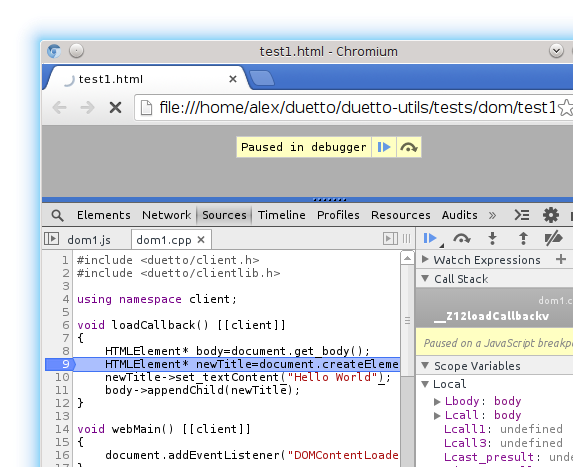
To generate a source map, you can use the following command (remember to enable debug information in clang using the –g option):
/opt/duetto/bin/clang++ -target duetto -g test.cpp -o test.js -duetto-sourcemap=test.js.map
Enabled Scalar Replacement of Aggregates (SROA) optimization
SROA is an standard compiler optimization which tries to replace complex objects with their members whenever possible. It’s a very critical optimization, especially for duetto, as every object which removed by SROA reduces the pressure on the garbage collector. LLVM has SROA support out of the box, but the existing implementation would often generate type-unsafe code that would break the duetto backend, so we have been forced to disable SROA up to now.
This release includes an improved SROA which always generates duetto-safe code, so we have been able to enable it again.
First support for collapsing allocations
We have introduced a new optimizations which tries to reduce memory pressure even more by recycling memory allocated for local variables. Whenever two or more allocations of the same type are used in disjoint sections of the same function they are merged into one.
Improved standard library support
We have fixed support for std::map, std::multimap, std::unordered_map, std::std, std::multiset and std::unordered_set which should be now fully working. sets and maps having pointers as the key are not yet supported.
Strict-mode JavaScript
Duetto-generated JavaScript now starts with “use strict”, a couple of small fixes have been made to generate fully strict-mode compliant code.
You can download duetto for Windows and Mac OS X on launchpad. Packages for Ubuntu and Debian are available from our PPA. You can also get the source code on GitHub.
Follow us on @leaningtech, Facebook and at www.leaningtech.com for updates.
Duetto 0.9.6: debugging C++ web applications within the browser
Posted by Alessandro Pignotti in Leaningtech on April 18, 2014
Hello everyone! Leaning Technologies is happy to present yet another feature-packed release of duetto — our C++ compiler for the Web.
Duetto 0.9.6 introduces the initial support for a new, highly-requested feature: in-browser debugging of your C++ web application. We hope you’ll like this! We also introduced some new powerful optimizations to reduce memory usage and pressure on the garbage collector, and extended our support for the standard library.
Initial support for integrated debugging using Source Maps
Source maps is a standard technology to debug code compiled to JavaScript. It’s already used by many tools that generate JavaScript, both from other languages and from JavaScript itself. Duetto is now able to seamlessly generate source maps from C++ code.
Modern browsers can automatically load the source map and display the original C++ code when an error occurs. You can also set breakpoints in the C++ file and the JavaScript execution will stop when the corresponding line is reached. You can even single step the execution while looking at C++ code.
To generate a source map, you can use the following command (remember to enable debug information in clang using the –g option):
/opt/duetto/bin/clang++ -target duetto -g test.cpp -o test.js -duetto-sourcemap=test.js.map
Enabled Scalar Replacement of Aggregates (SROA) optimization
SROA is an standard compiler optimization which tries to replace complex objects with their members whenever possible. It’s a very critical optimization, especially for duetto, as every object which removed by SROA reduces the pressure on the garbage collector. LLVM has SROA support out of the box, but the existing implementation would often generate type-unsafe code that would break the duetto backend, so we have been forced to disable SROA up to now.
This release includes an improved SROA which always generates duetto-safe code, so we have been able to enable it again.
First support for collapsing allocations
We have introduced a new optimizations which tries to reduce memory pressure even more by recycling memory allocated for local variables. Whenever two or more allocations of the same type are used in disjoint sections of the same function they are merged into one.
Improved standard library support
We have fixed support for std::map, std::multimap, std::unordered_map, std::std, std::multiset and std::unordered_set which should be now fully working. sets and maps having pointers as the key are not yet supported.
Strict-mode JavaScript
Duetto-generated JavaScript now starts with “use strict”, a couple of small fixes have been made to generate fully strict-mode compliant code.
You can download duetto for Windows and Mac OS X on launchpad. Packages for Ubuntu and Debian are available from our PPA. You can also get the source code on GitHub.
Follow us on @leaningtech, Facebook and at www.leaningtech.com for updates.
Duetto (C++ for the Web) 0.9.4: Async RPCs, Promises, JavaScript interoperability
Posted by Alessandro Pignotti in Uncategorized on March 17, 2014
Around a month has passed since our talk at mloc.js. There we had a great opportunity to talk about the technology behind the duetto C++ compiler for the Web. We also made our first public announcement of our promise based support for asynchronous type safe RPC, which fits in our vision of C++ as the platform language for the Web, both on the client and on the server side.
Today, we announce the new, feature-packed release of Duetto — 0.9.4! This time, we really splurged, and added some quality features that we’re sure you’ll find interesting:
-
Initial support for promise-based async RPC
-
Strong interoperability with JavaScript
-
__asm__ to execute JavaScript from C++ code
-
[[jsexport]] attribute to use C++ objects from JavaScript
-
-
Support for C++ mutex/atomic/thread headers
As usual, you can find the full source code of the release here, plus binary packages for Debian/Ubuntu on our PPA, a binary setup for windows and a binary archive for Mac OS X here.
Asynchronous RPC using promises
With duetto you can “tag” a method to let the compiler know that the code should be compiled for the server side. The compiler also takes care of generating RPC boilerplate including type safe serialization of parameters and deserialization of the return value. While the basic model is synchronous, you can take advantage of promises to use fully type safe asynchronous RPC in duetto. See e.g. the following code:
// Pending requests for messages

vector<Promise<string>*> pendingRequests;

Promise<string>* getChatMessageRemote() [[server]]

{

      auto ret=new Promise<string>();

     // Store the new promise, you can use it later to complete

      // the request in asynchronous manner

     pendingRequests.push_back(ret);

     return ret;

}

void sendMessageRemote(const string& str) [[server]]

{

     for (auto p: pendingRequests)

          p->done(str);

     pendingRequests.clear();

}

void messageHandler(const string& newMessage) [[client]]

{

     client::console.log("Message received",newMessage.c_str());

}

void webMain() [[client]]

{

      // First wait for messages

     auto promise = getChatMessageRemote();

     // Add a callback to the promise

     promise->then(messageHandler);

     // Tell the promise that no more callbacks will be added

     promise->complete();

     // Now send a message, it will be echoed back

     sendMessageRemote("Test message");

}
The code is a simple but working example of a multi-user chat application. The getChatMessageRemote method returns a promise immediately after being called, without waiting for the server answer. On the server side we create a promise and return it. We also need to store it somewhere to eventually fulfill the promise by sending a value.
The client code needs to set a callback to receive the value when the promise will be eventually fulfilled. Later on the client send a chat message using the sendMessageRemote server method. This method is synchronous and will return only after the server side execution is completed. The server echoes the message back to all connected clients by fulfilling all pending promises.
Strong JS interoperability
This release of duetto includes two features that provide a superior integration with manually written JavaScript code: the [[jsexport]] class attribute and __asm__ support for inline JavaScript.
[[jsexport]] class attribute
We have introduced preliminary support for a new attribute: [[jsexport]]. This attribute is designed to be applied on C++ classes, doing so will cause make the class available to manually written JavaScript code. The following example shows its typical use:
class [[jsexport]] ExportExample

{

private:

    float a;

    int b;

public:

     ExportExample(float _a, int _b):a(_a),b(_b)

     {

     }

     void testMethod()

      {

          client::console.log(“Float value is”, a);

      }

};
During compilation duetto will generate bridge code to expose the ExportExample C++ class to JavaScript code. You can then use the class when writing JS code
// Using jsexport-ed classes from JavaScript code

var cppobj = new ExportExample(0.1, 42);

cppobj.testMethod();
The [[jexport]] attribute places some limitations on the class. In particular, the object must have a trivial destructor and no overloaded methods. Moreover operators can’t be exported to JavaScript. Having a trivial destructor is necessary to make sure that the regular Garbage Collection mechanism is sufficient to reclaim the object. We plan to expand this feature in the future to reduce any limitations as much as possible.
Inline JavaScript using __asm__
This release also adds support for inserting arbitrary JavaScript code inside C++ code using the __asm__ functionality. Our design choice has been to put no limit on what you can do inside __asm__, including breaking the program, so be careful when taking advantage of this capability.
void webMain()
{
}
At the moment only this simple form of JS code insertion is supported. It’s not currently possible to pass variables from surrounding C++ code or return a value from __asm__, but we will extend this support in the future.
Support for C++ mutex/atomic/thread headers
Some C++ functionalities, especially the ones related to multi-threading, do not have a direct mapping on the browser platform. That said, we want to provide as much compatibility as possible with existing C++ code to reduce the effort when using duetto for porting.
As of duetto 0.9.4, we support the following C++ threading primitives:
-
mutex: Implemented as plain counters, mutexes cannot block execution but report an error if a non-recursive mutex is acquired twice.
-
atomic: Implemented as plain integers, since the browser is not actually concurrent there is no real support for atomic operations.
-
thread: Modern browsers support WebWorkers, but the threading model does not map to the one expected by C++ threads. We chose to make the user aware that C++ threads are not supported by adding an explicit error message when the thread header is included in code compiled with duetto.
Follow us on @leaningtech, Facebook and at www.leaningtech.com for updates.
Duetto (C++ for the Web) 0.9.4: Async RPCs, Promises, JavaScript interoperability
Posted by Alessandro Pignotti in Uncategorized on March 17, 2014
Around a month has passed since our talk at mloc.js. There we had a great opportunity to talk about the technology behind the duetto C++ compiler for the Web. We also made our first public announcement of our promise based support for asynchronous type safe RPC, which fits in our vision of C++ as the platform language for the Web, both on the client and on the server side.
Today, we announce the new, feature-packed release of Duetto — 0.9.4! This time, we really splurged, and added some quality features that we’re sure you’ll find interesting:
-
Initial support for promise-based async RPC
-
Strong interoperability with JavaScript
-
__asm__ to execute JavaScript from C++ code
-
[[jsexport]] attribute to use C++ objects from JavaScript
-
-
Support for C++ mutex/atomic/thread headers
As usual, you can find the full source code of the release here, plus binary packages for Debian/Ubuntu on our PPA, a binary setup for windows and a binary archive for Mac OS X here.
Asynchronous RPC using promises
With duetto you can “tag” a method to let the compiler know that the code should be compiled for the server side. The compiler also takes care of generating RPC boilerplate including type safe serialization of parameters and deserialization of the return value. While the basic model is synchronous, you can take advantage of promises to use fully type safe asynchronous RPC in duetto. See e.g. the following code:
// Pending requests for messages

vector<Promise<string>*> pendingRequests;

Promise<string>* getChatMessageRemote() [[server]]

{

      auto ret=new Promise<string>();

     // Store the new promise, you can use it later to complete

      // the request in asynchronous manner

     pendingRequests.push_back(ret);

     return ret;

}

void sendMessageRemote(const string& str) [[server]]

{

     for (auto p: pendingRequests)

          p->done(str);

     pendingRequests.clear();

}

void messageHandler(const string& newMessage) [[client]]

{

     client::console.log("Message received",newMessage.c_str());

}

void webMain() [[client]]

{

      // First wait for messages

     auto promise = getChatMessageRemote();

     // Add a callback to the promise

     promise->then(messageHandler);

     // Tell the promise that no more callbacks will be added

     promise->complete();

     // Now send a message, it will be echoed back

     sendMessageRemote("Test message");

}
The code is a simple but working example of a multi-user chat application. The getChatMessageRemote method returns a promise immediately after being called, without waiting for the server answer. On the server side we create a promise and return it. We also need to store it somewhere to eventually fulfill the promise by sending a value.
The client code needs to set a callback to receive the value when the promise will be eventually fulfilled. Later on the client send a chat message using the sendMessageRemote server method. This method is synchronous and will return only after the server side execution is completed. The server echoes the message back to all connected clients by fulfilling all pending promises.
Strong JS interoperability
This release of duetto includes two features that provide a superior integration with manually written JavaScript code: the [[jsexport]] class attribute and __asm__ support for inline JavaScript.
[[jsexport]] class attribute
We have introduced preliminary support for a new attribute: [[jsexport]]. This attribute is designed to be applied on C++ classes, doing so will cause make the class available to manually written JavaScript code. The following example shows its typical use:
class [[jsexport]] ExportExample

{

private:

    float a;

    int b;

public:

     ExportExample(float _a, int _b):a(_a),b(_b)

     {

     }

     void testMethod()

      {

          client::console.log(“Float value is”, a);

      }

};
During compilation duetto will generate bridge code to expose the ExportExample C++ class to JavaScript code. You can then use the class when writing JS code
// Using jsexport-ed classes from JavaScript code

var cppobj = new ExportExample(0.1, 42);

cppobj.testMethod();
The [[jexport]] attribute places some limitations on the class. In particular, the object must have a trivial destructor and no overloaded methods. Moreover operators can’t be exported to JavaScript. Having a trivial destructor is necessary to make sure that the regular Garbage Collection mechanism is sufficient to reclaim the object. We plan to expand this feature in the future to reduce any limitations as much as possible.
Inline JavaScript using __asm__
This release also adds support for inserting arbitrary JavaScript code inside C++ code using the __asm__ functionality. Our design choice has been to put no limit on what you can do inside __asm__, including breaking the program, so be careful when taking advantage of this capability.
void webMain()
{
}
At the moment only this simple form of JS code insertion is supported. It’s not currently possible to pass variables from surrounding C++ code or return a value from __asm__, but we will extend this support in the future.
Support for C++ mutex/atomic/thread headers
Some C++ functionalities, especially the ones related to multi-threading, do not have a direct mapping on the browser platform. That said, we want to provide as much compatibility as possible with existing C++ code to reduce the effort when using duetto for porting.
As of duetto 0.9.4, we support the following C++ threading primitives:
-
mutex: Implemented as plain counters, mutexes cannot block execution but report an error if a non-recursive mutex is acquired twice.
-
atomic: Implemented as plain integers, since the browser is not actually concurrent there is no real support for atomic operations.
-
thread: Modern browsers support WebWorkers, but the threading model does not map to the one expected by C++ threads. We chose to make the user aware that C++ threads are not supported by adding an explicit error message when the thread header is included in code compiled with duetto.
Follow us on @leaningtech, Facebook and at www.leaningtech.com for updates.
Duetto (C++ for the Web) 0.9.3 is out — Usability and standard library improvements, Windows installer
Posted by Alessandro Pignotti in Leaningtech on January 11, 2014
At Leaning Technologies we are glad to announce our newest release of duetto, our C++ compiler for Web applications.
This release, marked as 0.9.3, contains some improvements:
-
Generated JS files are now self contained and do not need the duetto.js helper file
-
C++11 is now the default compilation mode
-
New Windows installer
-
Improvements to standard C++ library support, in particular now iostream, including cout and cerr are supported
-
stdout and stderr support, using browser console
We also have a new major release in the works, which will provide some quite interesting new features to duetto. We will announce some of them at the mloc.js conference in Budapest this February 13 – 14.
You can find binaries and installers of duetto for Windows and Mac OS X on launchpad. Packages for Ubuntu and Debian are available from our PPA. Source tarballs are available on launchpad as well.
Installation and getting started guides are available at wiki.leaningtech.com
Follow us on @leaningtech, Facebook and at www.leaningtech.com for updates.
Duetto (C++ for the Web) 0.9.3 is out — Usability and standard library improvements, Windows installer
Posted by Alessandro Pignotti in Leaningtech on January 11, 2014
At Leaning Technologies we are glad to announce our newest release of duetto, our C++ compiler for Web applications.
This release, marked as 0.9.3, contains some improvements:
-
Generated JS files are now self contained and do not need the duetto.js helper file
-
C++11 is now the default compilation mode
-
New Windows installer
-
Improvements to standard C++ library support, in particular now iostream, including cout and cerr are supported
-
stdout and stderr support, using browser console
We also have a new major release in the works, which will provide some quite interesting new features to duetto. We will announce some of them at the mloc.js conference in Budapest this February 13 – 14.
You can find binaries and installers of duetto for Windows and Mac OS X on launchpad. Packages for Ubuntu and Debian are available from our PPA. Source tarballs are available on launchpad as well.
Installation and getting started guides are available at wiki.leaningtech.com
Follow us on @leaningtech, Facebook and at www.leaningtech.com for updates.
Duetto (C++ for the Web) 0.9.2 is out — OpenGL ES implementation in WebGL and toolchain improvements
Posted by Alessandro Pignotti in Leaningtech on December 2, 2013

A lot of progress was made here at Leaningtech during the last few weeks, leading to our latest release of duetto — version 0.9.2.
For this version we have been focusing mainly on usability. The most relevant updates include:
-
A WebGL-based OpenGL ES implementation
-
Automatic linking of system libraries;
-
General toolchain usability improvement, including simplified command line syntax for common operations.
Duetto’s OpenGL ES implementation exposes the standard API available on desktop and mobile to Web developers. We have designed it to make porting of existing GLES apps and games easier, but it is of course possible to use it in new code. Moreover, we expose the underlying WebGL context to make it possible to mix and match between GLES and WebGL code, to take advantage of the native capabilities of the browser like using JPEG and PNG compressed images as textures. This GLES implementation is used in this Nontetris game, developed in C++ using duetto. You can find its source code here.
The last two points are aimed at a general effort of increasing the ease of use of duetto — and reducing the likelihood of the most frequent errors related to missing links to libraries.
You can find binary archives of duetto for Windows and Mac OS X on launchpad. Packages for Ubuntu and Debian are available from our PPA. Source tarballs are available on launchpad as well.
We have started an open wiki here. On the wiki you can already find installation instructions for the various platforms, build instructions and the getting started guide. Feel also free to contribute to the wiki if you feel something is missing.
We are also happy to announce that we will be speaking at the mloc.js conference in February in Budapest. We look forward to it as a great chance to meet some awesome people working on JS as a compiler target and discuss about our technology.
Follow us on @leaningtech, Facebook and at www.leaningtech.com for updates.
Duetto (C++ for the Web) 0.9.2 is out — OpenGL ES implementation in WebGL and toolchain improvements
Posted by Alessandro Pignotti in Leaningtech on December 2, 2013
A lot of progress was made here at Leaningtech during the last few weeks, leading to our latest release of duetto — version 0.9.2.
For this version we have been focusing mainly on usability. The most relevant updates include:
-
A WebGL-based OpenGL ES implementation
-
Automatic linking of system libraries;
-
General toolchain usability improvement, including simplified command line syntax for common operations.
Duetto’s OpenGL ES implementation exposes the standard API available on desktop and mobile to Web developers. We have designed it to make porting of existing GLES apps and games easier, but it is of course possible to use it in new code. Moreover, we expose the underlying WebGL context to make it possible to mix and match between GLES and WebGL code, to take advantage of the native capabilities of the browser like using JPEG and PNG compressed images as textures. This GLES implementation is used in this Nontetris game, developed in C++ using duetto. You can find its source code here.
The last two points are aimed at a general effort of increasing the ease of use of duetto — and reducing the likelihood of the most frequent errors related to missing links to libraries.
You can find binary archives of duetto for Windows and Mac OS X on launchpad. Packages for Ubuntu and Debian are available from our PPA. Source tarballs are available on launchpad as well.
We have started an open wiki here. On the wiki you can already find installation instructions for the various platforms, build instructions and the getting started guide. Feel also free to contribute to the wiki if you feel something is missing.
We are also happy to announce that we will be speaking at the mloc.js conference in February in Budapest. We look forward to it as a great chance to meet some awesome people working on JS as a compiler target and discuss about our technology.
Follow us on @leaningtech, Facebook and at www.leaningtech.com for updates.
Comparing Duetto with Emscripten: a follow-up
Posted by Alessandro Pignotti in Leaningtech on November 15, 2013
Yesterday, Alon Zakai (alias kripken, creator of Emscripten) wrote an excellent post comparing three C++ to JS compilers: Mandreel, Emscripten and Duetto. We would like to provide a few more details regarding Duetto as we feel that, although the comparison was definitely fair, we can add some points which have been missed.
Memory model: Contrarily to Mandreel and Emscripten, which emulate a traditional flat address space using a singleton typed array, Duetto maps C++ objects to JS objects. This naturally implies an overhead both in terms of meta-data that the JS engine manages and in terms of computational work that the Garbage Collector (GC) needs to do. While these may look like major disadvantages, other factors should be taken into account. The computational overhead does not go wasted, as it is functional to keep memory usage in check and make sure that the amount of occupied memory is closer to the amount actually required.
In addition, the typed array based memory model incurs in some overhead as well, as memory areas are still managed using some kind of malloc. And they also suffer a lot from fragmentation as the browser can’t reclaim memory in the middle of the array which is not currently being used.
We strongly believe that the duetto memory model being based on JS objects is more fair to other applications, both native and web-based and to the user’s system as a whole. If the system gets tight on memory, it is possible for the browser to reclaim currently unused objects used in code generated by duetto, on the other hand when a large typed array is used, the system can at best page-out unused or seldom used pages to swap since it has no way to know what memory is actually used and what is not. On the other hand it is definitely true that frequently allocating and deallocating objects may cause an unacceptable slowdown, but this is actually true for native programs as well and the solution is to re-use the same objects over and over (for example by creating pools) at the application level, and this is something that is, of course, possible using duetto as well. Generally we believe that using JS objects also make duetto compiled code more similar to handwritten JS code, which is already handled very well by JS engines, with the added advantage of guaranteed type immutability which can be exploited by the engine to generate faster code. Still, duetto is flexible enough that it will be possible, in the future, to support using an emscripten like memory model on a type-by-type basis. This would be useful to adapt to various workloads and for compatibility with code compiled by emscripten.
APIs: Duetto is built around the concept that the browser is a platform having JS as the machine language. Such platform has APIs like WebGL, HTML5 Canvas, DOM events and so on which are the lowest level accessible functionalities. With Duetto you can use all of them directly from C++ and no JS wrapper code is required.
What about the cross platform APIs used on native systems like SDL and OpenAL? Well, we don’t currently support them, but they can be ported to Duetto by writing a new backend for the browser platform, similarly to what has been already done to port them to Windows, Linux and Mac. And using duetto it is possible to write such porting code directly in C++ because you have direct access to the browser APIs. Once the cross platform APIs support duetto, applications using them will run as well without much (or any) work.
And what about GLES? Well, we received so many requests for this functionality that we are working on providing a WebGL based GLES implementation ourselves. We plan to release it very soon. With that it should be possible to build programs using GLES with duetto by only changing the windowing system initialization code, similarly to porting from windows’ WGL to X11 glX.
C++ compatibility: Alon correctly states that duetto has “partial” C++ compatibility. This is true, but given the incredible amount of capabilities that the C++ language has, it is important to clarify what these limitations are.
Let’s start from the basis: our C++ compiler was of course not written from scratch, but was based on clang. This means that we inherit complete support for all C++ features, including recent and advanced ones like C++11, template support and lambda. And we actually use such features in the C++ code which manages transparent client/server RPCs.
The limitations are more about a few specific unsupported capabilities, currently the major ones are: missing support for virtual inheritance/virtual base classes, some issues with pointer comparison in a couple of corner cases and missing support for some parts of the standard library. But we would like to stress that those limitations are (mostly) non structural and we will do our best to increase the compatibility as much as possible while still be coherent with C++ philosophy of exposing all platform capabilities and limitations to the user.
Performance: We have worked with computer systems long enough to all agree that micro-benchmarks have little to do with performance on real world scenarios. We also know that Duetto still produces suboptimal code for many common cases that we plan to fix. We look forward to try and profile Duetto generated code from a large, real world code base, to find out how it performs and what needs to be optimized.
In summary, we think that Alon’s review of our technology is pretty accurate, and we look forward making more and more of Duetto’s features known to the community, with dedicated posts and documentation. We have been impressed by the feedback we got with our first release — and look forward to hear your opinion.
Duetto release 0.9.1 is now available as source tarballs and binaries for Ubuntu/Debian (PPA) and Windows. MacOSX builds will be available soon. Feel free to report bugs, and request features here.
Follow us on @leaningtech, Facebook and at www.leaningtech.com for updates.
Comparing Duetto with Emscripten: a follow-up
Posted by Alessandro Pignotti in Leaningtech on November 15, 2013
Yesterday, Alon Zakai (alias kripken, creator of Emscripten) wrote an excellent post comparing three C++ to JS compilers: Mandreel, Emscripten and Duetto. We would like to provide a few more details regarding Duetto as we feel that, although the comparison was definitely fair, we can add some points which have been missed.
Memory model: Contrarily to Mandreel and Emscripten, which emulate a traditional flat address space using a singleton typed array, Duetto maps C++ objects to JS objects. This naturally implies an overhead both in terms of meta-data that the JS engine manages and in terms of computational work that the Garbage Collector (GC) needs to do. While these may look like major disadvantages, other factors should be taken into account. The computational overhead does not go wasted, as it is functional to keep memory usage in check and make sure that the amount of occupied memory is closer to the amount actually required.
In addition, the typed array based memory model incurs in some overhead as well, as memory areas are still managed using some kind of malloc. And they also suffer a lot from fragmentation as the browser can’t reclaim memory in the middle of the array which is not currently being used.
We strongly believe that the duetto memory model being based on JS objects is more fair to other applications, both native and web-based and to the user’s system as a whole. If the system gets tight on memory, it is possible for the browser to reclaim currently unused objects used in code generated by duetto, on the other hand when a large typed array is used, the system can at best page-out unused or seldom used pages to swap since it has no way to know what memory is actually used and what is not. On the other hand it is definitely true that frequently allocating and deallocating objects may cause an unacceptable slowdown, but this is actually true for native programs as well and the solution is to re-use the same objects over and over (for example by creating pools) at the application level, and this is something that is, of course, possible using duetto as well. Generally we believe that using JS objects also make duetto compiled code more similar to handwritten JS code, which is already handled very well by JS engines, with the added advantage of guaranteed type immutability which can be exploited by the engine to generate faster code. Still, duetto is flexible enough that it will be possible, in the future, to support using an emscripten like memory model on a type-by-type basis. This would be useful to adapt to various workloads and for compatibility with code compiled by emscripten.
APIs: Duetto is built around the concept that the browser is a platform having JS as the machine language. Such platform has APIs like WebGL, HTML5 Canvas, DOM events and so on which are the lowest level accessible functionalities. With Duetto you can use all of them directly from C++ and no JS wrapper code is required.
What about the cross platform APIs used on native systems like SDL and OpenAL? Well, we don’t currently support them, but they can be ported to Duetto by writing a new backend for the browser platform, similarly to what has been already done to port them to Windows, Linux and Mac. And using duetto it is possible to write such porting code directly in C++ because you have direct access to the browser APIs. Once the cross platform APIs support duetto, applications using them will run as well without much (or any) work.
And what about GLES? Well, we received so many requests for this functionality that we are working on providing a WebGL based GLES implementation ourselves. We plan to release it very soon. With that it should be possible to build programs using GLES with duetto by only changing the windowing system initialization code, similarly to porting from windows’ WGL to X11 glX.
C++ compatibility: Alon correctly states that duetto has “partial” C++ compatibility. This is true, but given the incredible amount of capabilities that the C++ language has, it is important to clarify what these limitations are.
Let’s start from the basis: our C++ compiler was of course not written from scratch, but was based on clang. This means that we inherit complete support for all C++ features, including recent and advanced ones like C++11, template support and lambda. And we actually use such features in the C++ code which manages transparent client/server RPCs.
The limitations are more about a few specific unsupported capabilities, currently the major ones are: missing support for virtual inheritance/virtual base classes, some issues with pointer comparison in a couple of corner cases and missing support for some parts of the standard library. But we would like to stress that those limitations are (mostly) non structural and we will do our best to increase the compatibility as much as possible while still be coherent with C++ philosophy of exposing all platform capabilities and limitations to the user.
Performance: We have worked with computer systems long enough to all agree that micro-benchmarks have little to do with performance on real world scenarios. We also know that Duetto still produces suboptimal code for many common cases that we plan to fix. We look forward to try and profile Duetto generated code from a large, real world code base, to find out how it performs and what needs to be optimized.
In summary, we think that Alon’s review of our technology is pretty accurate, and we look forward making more and more of Duetto’s features known to the community, with dedicated posts and documentation. We have been impressed by the feedback we got with our first release — and look forward to hear your opinion.
Duetto release 0.9.1 is now available as source tarballs and binaries for Ubuntu/Debian (PPA) and Windows. MacOSX builds will be available soon. Feel free to report bugs, and request features here.
Follow us on @leaningtech, Facebook and at www.leaningtech.com for updates.